Following our recent post regarding Bumptop, see in the following Video Jeff Han and Phil Davidson demonstrating how a multi-touch driven computer screen will change the way we work and play.
Source: YouTube
Read the full article.
Showing posts with label GUI. Show all posts
Showing posts with label GUI. Show all posts
Wednesday, January 24, 2007


Wednesday, November 22, 2006
Where do you get your icons from?
I have never been able to find a decent royalty-free library of icons but you only have what you pay for, haven’t you?
IconExperience is the best library I have found and I can only recommend it. It is comprehensive and affordable. Incors have just released version 2.0 which has more than 2000 icons and now includes the 128*128 format.
If you know any other valuable source of icons, please comment.
IconExperience is the best library I have found and I can only recommend it. It is comprehensive and affordable. Incors have just released version 2.0 which has more than 2000 icons and now includes the 128*128 format.
If you know any other valuable source of icons, please comment.
Wednesday, October 25, 2006
Designing gadgets and widgets for uploading files to Memba Velodoc
Requirements
A windows sidebar gadget is a piece of DHTML hosted in the sidebar. Generally what you can do with DHTML can be done in a gadget.
There are limitations though, most of which are related to the browser security sandbox. Effectively a gadget is hosted locally, which has impacts on how it can communicate with remote web sites.
In particular, developing a file upload gadget with a progress bar in DHTML requires a cross-domain iFrame and scripting the iFrame in this case is forbidden. I have tried two nested iFrames which gives you scripting but the deepest iFrame opens in a new browser window instead of within the gadget. The only workaround I have found in half a day is to display the progress bar in a new browser window, but this does not look good and I was not prepared to lose more time.
So, I have considered XBAP WPF browser applications and although there is no File Upload control, I seem to have found the foundations for a file upload gadget here:
But WPF development is really early stage, development environment is primitive, documentation is lacking and I got worried about some warnings related to the sandbox that are mentioned in the literature quoted above.
In these circumstances, the only alternative was Macromedia Flash. I have even found a couple of examples running on the web. I have hosted them within an iFrame of a bespoke gadget and there I was: at the end of day one, I had my design and a fully functional (but ugly) prototype. Further documentation is available at:
- A sender, a Receiver, a Subject, a Message, a File to upload and a checkbox to accept terms (see www.velodoc.net/login.aspx);
- A progress bar to monitor upload progress;
- A professional look & feel;
- To be developed in 3 to 5 days max.
- http://windowssdk.msdn.microsoft.com
/en-us/library/ms722795.aspx - http://msdn.microsoft.com/library/default.asp?
url=/library/en-us/sidebar/sidebar/overviews/gdo.asp - http://microsoftgadgets.com/Sidebar/
DevelopmentOverview.aspx - http://www.microsoft.com/technet/scriptcenter/
topics/vista/gadgets-pt1.mspx
A windows sidebar gadget is a piece of DHTML hosted in the sidebar. Generally what you can do with DHTML can be done in a gadget.
There are limitations though, most of which are related to the browser security sandbox. Effectively a gadget is hosted locally, which has impacts on how it can communicate with remote web sites.
In particular, developing a file upload gadget with a progress bar in DHTML requires a cross-domain iFrame and scripting the iFrame in this case is forbidden. I have tried two nested iFrames which gives you scripting but the deepest iFrame opens in a new browser window instead of within the gadget. The only workaround I have found in half a day is to display the progress bar in a new browser window, but this does not look good and I was not prepared to lose more time.
So, I have considered XBAP WPF browser applications and although there is no File Upload control, I seem to have found the foundations for a file upload gadget here:
- http://blogs.msdn.com/mszcool/archive/2006/04/25/
583317.aspx - http://blogs.msdn.com/karstenj/archive/2006/10/04/
WPF-Vista-Gadgets-_2D00_-Part-1_3A00_-Using-XBAP-and-IFRAME.aspx - http://laurenlavoie.com/avalon/154
- http://www.codeproject.com/csharp/uploadfileex.asp
But WPF development is really early stage, development environment is primitive, documentation is lacking and I got worried about some warnings related to the sandbox that are mentioned in the literature quoted above.
In these circumstances, the only alternative was Macromedia Flash. I have even found a couple of examples running on the web. I have hosted them within an iFrame of a bespoke gadget and there I was: at the end of day one, I had my design and a fully functional (but ugly) prototype. Further documentation is available at:
Sunday, October 22, 2006
Choosing a GUI library for ASP.NET
You can get an exhaustive list of .NET components at http://www.componentsource.com/ but if you want a GUI library for ASP.NET, your choice is really between:
I generally find Infragistics to be a richer framework than Telerik and ComponentArt, with two drawbacks: (1) more complex to use and (2) fatter Javascript library to load on the client.
On the mid-term, ComponentArt may have taken a competitive edge by rewriting its components on top of the Microsoft Ajax framework (code-named Atlas).
On the long-term, it is difficult to predict the impact of WPF on web interfaces. On one hand, there is a need for richer interfaces that are easier to develop and Microsoft is committed to deliver the technology (WPF/E) and tools to achieve just that. On the other hand, WPF is really nothing more than Flash the Microsoft way, and very few web sites are developed with Flash yet although the Flash plug-in is available on 90% of internet PCs.
I have personally used Sheridan and now Infragistics controls for years, so I stick with them but if I had to make a new choice now, I would definitely opt for the rewritten ComponentArt controls.
- Infragistics (http://www.infragistics.com/)
- Telerik (http://www.telerik.com/)
- ComponentArt (http://www.componentart.com/)
- Framework is not sufficiently exhaustive to cover 99% of the requirements;
- Vendor has not been around for a sufficiently long time;
- Updates are not sufficiently frequent to follow the pace of new developments like Ajax;
- Developer license is not royalty-free and/or price is unaffordable;
I generally find Infragistics to be a richer framework than Telerik and ComponentArt, with two drawbacks: (1) more complex to use and (2) fatter Javascript library to load on the client.
On the mid-term, ComponentArt may have taken a competitive edge by rewriting its components on top of the Microsoft Ajax framework (code-named Atlas).
On the long-term, it is difficult to predict the impact of WPF on web interfaces. On one hand, there is a need for richer interfaces that are easier to develop and Microsoft is committed to deliver the technology (WPF/E) and tools to achieve just that. On the other hand, WPF is really nothing more than Flash the Microsoft way, and very few web sites are developed with Flash yet although the Flash plug-in is available on 90% of internet PCs.
I have personally used Sheridan and now Infragistics controls for years, so I stick with them but if I had to make a new choice now, I would definitely opt for the rewritten ComponentArt controls.
Thursday, October 12, 2006
Preventing page caching and displaying “Page has expired” in ASP.NET 2.0
I have found two answers to this question:
Response.Buffer = True
Response.ExpiresAbsolute = Now().Subtract(New TimeSpan(1, 0, 0, 0))
Response.Expires = 0
Response.CacheControl = "no-cache"
Source: http://www.extremeexperts.com/Net/FAQ/DisablingBackButton.aspx
Note that Response.Expires is deprecated in ASP.NET and Response.Cache.SetExpires should be used instead.
<%@ OutputCache location="none" %>
Source: http://www.syncfusion.com/FAQ/aspnet/WEB_c25c.aspx
More details at http://www.c-sharpcorner.com/asp/Articles/CachingInASPDPL.asp
Response.Buffer = True
Response.ExpiresAbsolute = Now().Subtract(New TimeSpan(1, 0, 0, 0))
Response.Expires = 0
Response.CacheControl = "no-cache"
Source: http://www.extremeexperts.com/Net/FAQ/DisablingBackButton.aspx
Note that Response.Expires is deprecated in ASP.NET and Response.Cache.SetExpires should be used instead.
<%@ OutputCache location="none" %>
Source: http://www.syncfusion.com/FAQ/aspnet/WEB_c25c.aspx
More details at http://www.c-sharpcorner.com/asp/Articles/CachingInASPDPL.asp
Sunday, September 10, 2006
Atlas script manager control on login page raises a Javascript error in IE, not in Firefox
The error reported by IE is the following:
The solution is to add the following in web.config so that atlasglob.axd can be retrieved when the user is not logged in.
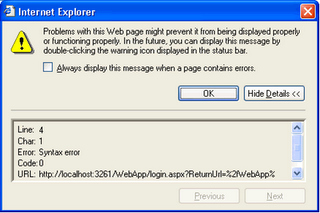
The solution is to add the following in web.config so that atlasglob.axd can be retrieved when the user is not logged in.
<location path="atlasglob.axd">
<system.web>
<authorization>
<allow users="*"/>
</authorization>
</system.web>
</location>
Monday, June 26, 2006
Ajax at last
I have always felt that HTML and more recently XML/XSL were a step back from object oriented programming and rich user interfaces.
In the mid-90’s, we had very neat C++ user interface (UI) frameworks implementing a model-view-controller (MVC) like Microsoft Foundation Classes (MFC). With these frameworks we could build 100% object oriented applications that were:
It all went away with the advent of HTML, a rudimentary technology to present and link documentation pages, which has been diverted from its original purpose to develop business applications, just because IT departments were missing the days of mainframes when an application had to be deployed only once on a server to be available everywhere.
Suddenly our applications became very slow. Everything had to be done with a bunch of simplistic UI controls. Data had to be round-tripped to the server to be validated or for the user interface to be updated accordingly. We had to page through long lists to find our items with limited sorting capabilities. Merging data into Word was near to impossible except using the old copy-paste trick. Without proper tools, architecting, designing, developing, testing and maintaining these applications was significantly more difficult.
Then came Java with Swing and the promise of an MVC framework including rich UI controls. I really thought that Java would become the Holy Grail of web interfaces. Java applets were offering the best of both worlds with the promise of “develop once, run everywhere”. But again, we have been deceived; the promise was not kept and information technology (IT) departments did not want to deploy the plug-in with some help from Microsoft, who ditched Java after embracing it.
Not long ago after releasing .NET framework, Microsoft has praised the benefits of ‘smart clients’ which would offer the best of web architectures and rich user interfaces but nobody really bought into it.
Now the market reiterates its promise of a rich UI for the web with Asynchronous JavaScript and Xml (Ajax). People will tell you that Ajax has been around for quite some time and that Outlook Web Access 2000 was the first application implementing Ajax in the late 90’s. Ajax is based on the XMLHttpRequest object which is available since Internet Explorer version 4. XMLHttpRequest allows code to pass a request to the server without reposting the entire page but Ajax is much more than that otherwise we would have heard about it before.
To get a rich UI, you need much more that the XMLHttpRequest object; you need:
To be honest, Ajax is a jumble of technologies clumsily put together: some Javascript code within an HTML page scripts a binary client object to post data using HTTP to a web server where some Java or .NET code is interpreted by a virtual machine in view to retrieve or save data into a SQL database. I know Ajax is not the whole chain, but what a mess! This mess has good chances to win the rich UI also known as Web 2.0 battle because it does not compromise the ease of deployment of applications. After 10 years of web architecture hegemony, it is going to be good to retrieve the user experience of rich user interfaces.
In the mid-90’s, we had very neat C++ user interface (UI) frameworks implementing a model-view-controller (MVC) like Microsoft Foundation Classes (MFC). With these frameworks we could build 100% object oriented applications that were:
- Easy to architect, design, develop, test and maintain especially because the tools were very mature;
- Providing rich UI features like complex controls, dynamic data exchange, object linking and embedding, drag and drop or notifications that update the interface when the underlying data changes.
It all went away with the advent of HTML, a rudimentary technology to present and link documentation pages, which has been diverted from its original purpose to develop business applications, just because IT departments were missing the days of mainframes when an application had to be deployed only once on a server to be available everywhere.
Suddenly our applications became very slow. Everything had to be done with a bunch of simplistic UI controls. Data had to be round-tripped to the server to be validated or for the user interface to be updated accordingly. We had to page through long lists to find our items with limited sorting capabilities. Merging data into Word was near to impossible except using the old copy-paste trick. Without proper tools, architecting, designing, developing, testing and maintaining these applications was significantly more difficult.
Then came Java with Swing and the promise of an MVC framework including rich UI controls. I really thought that Java would become the Holy Grail of web interfaces. Java applets were offering the best of both worlds with the promise of “develop once, run everywhere”. But again, we have been deceived; the promise was not kept and information technology (IT) departments did not want to deploy the plug-in with some help from Microsoft, who ditched Java after embracing it.
Not long ago after releasing .NET framework, Microsoft has praised the benefits of ‘smart clients’ which would offer the best of web architectures and rich user interfaces but nobody really bought into it.
Now the market reiterates its promise of a rich UI for the web with Asynchronous JavaScript and Xml (Ajax). People will tell you that Ajax has been around for quite some time and that Outlook Web Access 2000 was the first application implementing Ajax in the late 90’s. Ajax is based on the XMLHttpRequest object which is available since Internet Explorer version 4. XMLHttpRequest allows code to pass a request to the server without reposting the entire page but Ajax is much more than that otherwise we would have heard about it before.
To get a rich UI, you need much more that the XMLHttpRequest object; you need:
- support from the industry which includes browser manufacturers and the support for XMLHttpRequest in Mozilla and other browsers is very recent;
- A choice of UI component frameworks that use XMLHttpRequest in the background to provide rich UI features because like me, you do not want to reinvent the wheel and develop a library of UI components. Infragistics, Telerik, ComponetArt, ComponentOne and the others have only recently released their Ajax UI frameworks.
To be honest, Ajax is a jumble of technologies clumsily put together: some Javascript code within an HTML page scripts a binary client object to post data using HTTP to a web server where some Java or .NET code is interpreted by a virtual machine in view to retrieve or save data into a SQL database. I know Ajax is not the whole chain, but what a mess! This mess has good chances to win the rich UI also known as Web 2.0 battle because it does not compromise the ease of deployment of applications. After 10 years of web architecture hegemony, it is going to be good to retrieve the user experience of rich user interfaces.
Subscribe to:
Posts (Atom)