Today, I was working on integrating a web application with Paypal. My IPN handler in my development environment could not be reached by Paypal, although my test web server was published to the Internet.
Having searched for simple ways to test a Url from the Internet, I have found the following which I recommend: http://www.changedetect.com/cd-test-url.asp
[Updated on 22 Oct 2006]
Endeavouring to compare web hosting packages, I have used:
http://www.vertain.com/?sst
[Updated on 25 Oct 2006]
An excellent and still free web site monitoring service is available at:
http://site24x7.com/
[Updated on 6 Nov 2006]]
A comprehensive DNS toolset can be found at:
http://www.dnsstuff.com/
Thursday, October 12, 2006


Preventing page caching and displaying “Page has expired” in ASP.NET 2.0
I have found two answers to this question:
Response.Buffer = True
Response.ExpiresAbsolute = Now().Subtract(New TimeSpan(1, 0, 0, 0))
Response.Expires = 0
Response.CacheControl = "no-cache"
Source: http://www.extremeexperts.com/Net/FAQ/DisablingBackButton.aspx
Note that Response.Expires is deprecated in ASP.NET and Response.Cache.SetExpires should be used instead.
<%@ OutputCache location="none" %>
Source: http://www.syncfusion.com/FAQ/aspnet/WEB_c25c.aspx
More details at http://www.c-sharpcorner.com/asp/Articles/CachingInASPDPL.asp
Response.Buffer = True
Response.ExpiresAbsolute = Now().Subtract(New TimeSpan(1, 0, 0, 0))
Response.Expires = 0
Response.CacheControl = "no-cache"
Source: http://www.extremeexperts.com/Net/FAQ/DisablingBackButton.aspx
Note that Response.Expires is deprecated in ASP.NET and Response.Cache.SetExpires should be used instead.
<%@ OutputCache location="none" %>
Source: http://www.syncfusion.com/FAQ/aspnet/WEB_c25c.aspx
More details at http://www.c-sharpcorner.com/asp/Articles/CachingInASPDPL.asp
Sunday, September 10, 2006
Atlas script manager control on login page raises a Javascript error in IE, not in Firefox
The error reported by IE is the following:
The solution is to add the following in web.config so that atlasglob.axd can be retrieved when the user is not logged in.
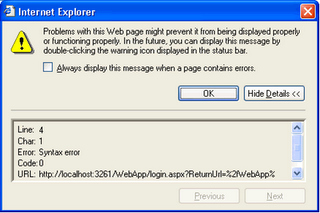
The solution is to add the following in web.config so that atlasglob.axd can be retrieved when the user is not logged in.
<location path="atlasglob.axd">
<system.web>
<authorization>
<allow users="*"/>
</authorization>
</system.web>
</location>
Sunday, July 09, 2006
Choosing a wiki and a blog
I recently had to choose both a wiki and a blog. I also expected to find both functionalities within the same product or hosted service as they are not that different.
My requirements for the wiki were the following:
http://www.wikimatrix.org/ is an invaluable resource to compare wiki software and two hosted solutions rise above average: jotspot and stikipad, although neither of them fulfils 100% of my requirements. Both products are basic but they do the job although authoring in Word, my top requirement, is not possible with these wikis.
I have not been able to find a comprehensive resource that compares blog software properly although there is some information at http://www.cmsmatrix.org/. The well-known products I have come across are Community Server (formerly .Text), Moveable Type and WordPress. The top services are Blogger, MySpace and MSN Spaces. There is now also a Yahoo offering based on Moveable Type. My preference is Blogger because there is a Word plug-in which works reasonably well and it is free. The main objection is that Blogger lacks proper categories.
My conclusion is that there is still a lot to improve on wikis and blogs especially to streamline the authoring process and to make navigation more fluid.
My requirements for the wiki were the following:
- Topic articles with versioning, attachments and discussions;
- Authoring of articles by invitation only, discussions opened to everyone;
- Hierarchical organisation of topics, ideally presented like online help: table of contents, index, search;
- Customisable UI (branding);
- Full-text search;
- Authoring using Word;
- Preferably a hosted service with a friendly URL,
- Ad-free.
- Authoring of articles by the owner of the blog only;
- Organisation by category and by date.
http://www.wikimatrix.org/ is an invaluable resource to compare wiki software and two hosted solutions rise above average: jotspot and stikipad, although neither of them fulfils 100% of my requirements. Both products are basic but they do the job although authoring in Word, my top requirement, is not possible with these wikis.
I have not been able to find a comprehensive resource that compares blog software properly although there is some information at http://www.cmsmatrix.org/. The well-known products I have come across are Community Server (formerly .Text), Moveable Type and WordPress. The top services are Blogger, MySpace and MSN Spaces. There is now also a Yahoo offering based on Moveable Type. My preference is Blogger because there is a Word plug-in which works reasonably well and it is free. The main objection is that Blogger lacks proper categories.
My conclusion is that there is still a lot to improve on wikis and blogs especially to streamline the authoring process and to make navigation more fluid.
Thursday, July 06, 2006
Why I rarely use ADO.NET Datasets
Have you ever seen these great presentations which teach you how to build a master-details web page in a few minutes without writing a single line of code using a combination of DataSets, TableAdapters, ObjectDataSources, GridViews and FormViews? There is a great one at http://download.microsoft.com/download/8/3/6/836dd5f8-fa92-499f-8219-0d326f13bf18/hilo_data_final.wmv.
There are sound technical reasons not to use DataSets in ASP.NET applications due to their stateful nature. These reasons are explained by Frans Bouma in his blog at http://weblogs.asp.net/fbouma/archive/2003/05/13/6966.aspx. I have experienced other reasons not to use DataSets as a business layer.
The entity-relationship model (the way data is organised in database) rarely corresponds so perfectly (see the video mentioned above) to the way you are going to present it. You will need to go through various transformations, for example:
So what should we do?
There are sound technical reasons not to use DataSets in ASP.NET applications due to their stateful nature. These reasons are explained by Frans Bouma in his blog at http://weblogs.asp.net/fbouma/archive/2003/05/13/6966.aspx. I have experienced other reasons not to use DataSets as a business layer.
The entity-relationship model (the way data is organised in database) rarely corresponds so perfectly (see the video mentioned above) to the way you are going to present it. You will need to go through various transformations, for example:
- You may have an invoice which is constituted of items and you need to present the invoice total which is actually the total of all item amounts. This total may also need to be presented in several currencies.
- You may have an N-N relationship between messages and contacts in your database, but you need to display a message with a To, Cc and Bcc fields which are separated lists of email addresses.
- You need to store UTC dates which will have to be converted using the time zone defined in your user’s profile;
- You need to store country codes which will have to be mapped to localized country names;
- You need to store a document status as a byte like 0, 1 and 2, which will have to be mapped to an enumerated value like “draft”, “approved” and “rejected”.
So what should we do?
- Implement your data access layer (DAL) as stored procedures handling create, read, update and delete (CRUD) operations;
- Implement a business logic layer (BLL) in C# or VB.NET calling stored procedures using data readers and commands, which will achieve much better performances.
- You only use datasets in rapid application development (RAD) scenarios, or when
- You have no other choice, for example when a component that you need (otherwise you would spend hours reinventing the wheel) requires datasets.
Thursday, June 29, 2006
Using Guids or Integers as database identifiers
Globally unique identifiers (Guids) are those strings that you find in COM clsid’s or in the windows registry and that look like: {ED256ABD-5BE7-4E46-BCDA-1E26B0364EBB}. You need 128 bits to store a Guid.
Integers are simply numbers that identify database rows in a table in an ascending order. They generally start at a seed of 1 and are automatically incremented by the database itself with an incremental step of 1, so you get 1, 2, 3, … Note that the database lets you specify the seed and the increment as required. You need 32 bits to store an integer.
The detractors of Guids claim that Guids require a lot more storage space, so they dramatically affect performances. If you want to store contact details with name, address, telephone and fax number in a table, you will easily get a dozen fields which will at least require 1000 bytes to store with a double-byte character set (required for working in any country). In this example, the difference on storage between using a Guid and an Integer as an identity is below 1%.
There are several advantages to using Guids:
Integers are simply numbers that identify database rows in a table in an ascending order. They generally start at a seed of 1 and are automatically incremented by the database itself with an incremental step of 1, so you get 1, 2, 3, … Note that the database lets you specify the seed and the increment as required. You need 32 bits to store an integer.
The detractors of Guids claim that Guids require a lot more storage space, so they dramatically affect performances. If you want to store contact details with name, address, telephone and fax number in a table, you will easily get a dozen fields which will at least require 1000 bytes to store with a double-byte character set (required for working in any country). In this example, the difference on storage between using a Guid and an Integer as an identity is below 1%.
There are several advantages to using Guids:
- Guids are well-typed in Java and in the .Net framework and I personally like to have a specific type for identifiers in the business layer;
- They can be generated in the application, so you do not have to query the database after an insert to know which identifier has been generated for you;
- They are guaranteed to be globally unique by using a combination of the network card MAC address and time at instant of generation, which is a reasonable guarantee. This is required in replication scenarios and SQL Server replication relies on Guids anyway, so using Guids is more future proof.
Wednesday, June 28, 2006
Stored procedures or inline SQL
Using stored procedure versus using inline SQL has been a debate for long in the software development community. There are good articles on the subject, including:
http://weblogs.asp.net/rhoward/archive/2003/11/17/38095.aspx
http://weblogs.asp.net/fbouma/archive/2003/11/18/38178.aspx
http://www.simple-talk.com/sql/t-sql-programming/to-sp-or-not-to-sp-in-sql-server/
http://www.simple-talk.com/sql/t-sql-programming/to-sp-or-not-to-sp-in-sql-server-an-argument-for-stored-procedures/
Generally the debate is about best practice, security, performance and maintainability with two camps:
- Rapid Application Developers prefer to rely on tools (RAD, ORM) that generate code, which all use inline SQL statements. This camp will claim that their tools enforce best practices, prevent SQL injection attacks and ensure maintainability while SQL execution plan caching makes performance equivalent to stored procedures.
- Developers who write their own business layer and data access layer code without support from such tools should opt for Stored Procedures which will make their application generally more secure, maintainable and performing better. I am on this side. Also note that having all your SQL code in stored procedures makes it easier to have it audited and reviewed by a database expert.
Tuesday, June 27, 2006
Enterprise Library
One of the most exciting Microsoft initiatives and sections of their web site is the patterns and practices section at http://msdn.microsoft.com/practices/. As part of this section, there is Enterprise Library for .NET Framework (EntLib).
EntLib is not really a framework. Microsoft calls it a collection of reusable and extensible application blocks for enterprise development. I would define it a set of helper classes which greatly simplify development in the following areas:
The Data Access Application Block (DAAB) is in my opinion the weakest block and the fans of O/R mapping frameworks like DataObjects, Genome or NHybernate generally laugh at it. Microsoft has made an attempt to complement the DAAB with the Data Mapping Application Block but it does not seem to be continued. I am not a big fan of O/R mapping tools. They make custom development very productive, but you have to tweak the code to get what you really need and optimize performances which makes maintenance more complex on the long term, especially when upgrading to new releases of the frameworks. So I write my own data access layer and I get the productivity gains and best practices from a template-based code generator like CodeSmith. In this scenario, DAAB is very neat and my only objection is that it is only database access. In my applications, I also have data in files. I would love an instrumented FAAB for file IO including XML/CSV/Text files and binary files. And with the new packaging APIs in WinFX for Office Open XML Formats, we could even imagine OAAB. Then we would have a complete data access application block.
Caching:
Considering the HttpContext.Cache in ASP.NET 2.0 the Caching Application Block is only an incremental improvement in this context but it delivers its full value in the context of WinForms applications.
Logging:
The logging application block is an alternative to Log4Net. You will need to find or build replacements for the default formatters and trace listeners. The default format of log entries does not make it easy to read large files when you can now associate XML with XSL stylesheets that let you drilldown into data effectively. And you will want to replace the default flat file trace listener with a rolling file trace listener that generates a new file every day or when the size reaches a threshold.
Exception Handling:
Exception handling is the block I personally prefer. I find writing good error handling code and reporting extremely difficult and the exception handling block provides much more than a few helper classes. You get best practices in an extensive framework with the full benefits of configurable policies. This is definitely the block that justifies adopting EntLib.
Security and Cryptography:
The security application block handles caching of security-related credentials and authorizations. Caching security-related credentials works well with Windows Forms applications but it does not fit the Membership provider model implemented in ASP.NET 2.0. For the same reason the authorization part of the block which makes a neat use of rules, does not integrate well in ASP.NET and especially with the navigation server controls. In my opinion, the block lacks proper server controls including menus and command buttons to constitute an application block and not simply a collection of helper classes.
What’s next?
The great new feature of .NET framework 3.0 (formerly WinFX) is workflow and we will need best practices and frameworks to get the full potential of this exciting technology. Microsoft makes an extensive use of RSS in the next releases of Vista, Internet Explorer and Office and the same requirement applies here. Finally we will also want to rip the benefits of the full-text indexing and search functionalities of Vista which are worth a new block.
EntLib is not really a framework. Microsoft calls it a collection of reusable and extensible application blocks for enterprise development. I would define it a set of helper classes which greatly simplify development in the following areas:
- Datatabase access;
- Caching;
- Logging;
- Exception Handling;
- Security and Cryptography;
- Rock-solid foundations (helper classes);
- Instrumentation.
The Data Access Application Block (DAAB) is in my opinion the weakest block and the fans of O/R mapping frameworks like DataObjects, Genome or NHybernate generally laugh at it. Microsoft has made an attempt to complement the DAAB with the Data Mapping Application Block but it does not seem to be continued. I am not a big fan of O/R mapping tools. They make custom development very productive, but you have to tweak the code to get what you really need and optimize performances which makes maintenance more complex on the long term, especially when upgrading to new releases of the frameworks. So I write my own data access layer and I get the productivity gains and best practices from a template-based code generator like CodeSmith. In this scenario, DAAB is very neat and my only objection is that it is only database access. In my applications, I also have data in files. I would love an instrumented FAAB for file IO including XML/CSV/Text files and binary files. And with the new packaging APIs in WinFX for Office Open XML Formats, we could even imagine OAAB. Then we would have a complete data access application block.
Caching:
Considering the HttpContext.Cache in ASP.NET 2.0 the Caching Application Block is only an incremental improvement in this context but it delivers its full value in the context of WinForms applications.
Logging:
The logging application block is an alternative to Log4Net. You will need to find or build replacements for the default formatters and trace listeners. The default format of log entries does not make it easy to read large files when you can now associate XML with XSL stylesheets that let you drilldown into data effectively. And you will want to replace the default flat file trace listener with a rolling file trace listener that generates a new file every day or when the size reaches a threshold.
Exception Handling:
Exception handling is the block I personally prefer. I find writing good error handling code and reporting extremely difficult and the exception handling block provides much more than a few helper classes. You get best practices in an extensive framework with the full benefits of configurable policies. This is definitely the block that justifies adopting EntLib.
Security and Cryptography:
The security application block handles caching of security-related credentials and authorizations. Caching security-related credentials works well with Windows Forms applications but it does not fit the Membership provider model implemented in ASP.NET 2.0. For the same reason the authorization part of the block which makes a neat use of rules, does not integrate well in ASP.NET and especially with the navigation server controls. In my opinion, the block lacks proper server controls including menus and command buttons to constitute an application block and not simply a collection of helper classes.
What’s next?
The great new feature of .NET framework 3.0 (formerly WinFX) is workflow and we will need best practices and frameworks to get the full potential of this exciting technology. Microsoft makes an extensive use of RSS in the next releases of Vista, Internet Explorer and Office and the same requirement applies here. Finally we will also want to rip the benefits of the full-text indexing and search functionalities of Vista which are worth a new block.
Monday, June 26, 2006
Ajax at last
I have always felt that HTML and more recently XML/XSL were a step back from object oriented programming and rich user interfaces.
In the mid-90’s, we had very neat C++ user interface (UI) frameworks implementing a model-view-controller (MVC) like Microsoft Foundation Classes (MFC). With these frameworks we could build 100% object oriented applications that were:
It all went away with the advent of HTML, a rudimentary technology to present and link documentation pages, which has been diverted from its original purpose to develop business applications, just because IT departments were missing the days of mainframes when an application had to be deployed only once on a server to be available everywhere.
Suddenly our applications became very slow. Everything had to be done with a bunch of simplistic UI controls. Data had to be round-tripped to the server to be validated or for the user interface to be updated accordingly. We had to page through long lists to find our items with limited sorting capabilities. Merging data into Word was near to impossible except using the old copy-paste trick. Without proper tools, architecting, designing, developing, testing and maintaining these applications was significantly more difficult.
Then came Java with Swing and the promise of an MVC framework including rich UI controls. I really thought that Java would become the Holy Grail of web interfaces. Java applets were offering the best of both worlds with the promise of “develop once, run everywhere”. But again, we have been deceived; the promise was not kept and information technology (IT) departments did not want to deploy the plug-in with some help from Microsoft, who ditched Java after embracing it.
Not long ago after releasing .NET framework, Microsoft has praised the benefits of ‘smart clients’ which would offer the best of web architectures and rich user interfaces but nobody really bought into it.
Now the market reiterates its promise of a rich UI for the web with Asynchronous JavaScript and Xml (Ajax). People will tell you that Ajax has been around for quite some time and that Outlook Web Access 2000 was the first application implementing Ajax in the late 90’s. Ajax is based on the XMLHttpRequest object which is available since Internet Explorer version 4. XMLHttpRequest allows code to pass a request to the server without reposting the entire page but Ajax is much more than that otherwise we would have heard about it before.
To get a rich UI, you need much more that the XMLHttpRequest object; you need:
To be honest, Ajax is a jumble of technologies clumsily put together: some Javascript code within an HTML page scripts a binary client object to post data using HTTP to a web server where some Java or .NET code is interpreted by a virtual machine in view to retrieve or save data into a SQL database. I know Ajax is not the whole chain, but what a mess! This mess has good chances to win the rich UI also known as Web 2.0 battle because it does not compromise the ease of deployment of applications. After 10 years of web architecture hegemony, it is going to be good to retrieve the user experience of rich user interfaces.
In the mid-90’s, we had very neat C++ user interface (UI) frameworks implementing a model-view-controller (MVC) like Microsoft Foundation Classes (MFC). With these frameworks we could build 100% object oriented applications that were:
- Easy to architect, design, develop, test and maintain especially because the tools were very mature;
- Providing rich UI features like complex controls, dynamic data exchange, object linking and embedding, drag and drop or notifications that update the interface when the underlying data changes.
It all went away with the advent of HTML, a rudimentary technology to present and link documentation pages, which has been diverted from its original purpose to develop business applications, just because IT departments were missing the days of mainframes when an application had to be deployed only once on a server to be available everywhere.
Suddenly our applications became very slow. Everything had to be done with a bunch of simplistic UI controls. Data had to be round-tripped to the server to be validated or for the user interface to be updated accordingly. We had to page through long lists to find our items with limited sorting capabilities. Merging data into Word was near to impossible except using the old copy-paste trick. Without proper tools, architecting, designing, developing, testing and maintaining these applications was significantly more difficult.
Then came Java with Swing and the promise of an MVC framework including rich UI controls. I really thought that Java would become the Holy Grail of web interfaces. Java applets were offering the best of both worlds with the promise of “develop once, run everywhere”. But again, we have been deceived; the promise was not kept and information technology (IT) departments did not want to deploy the plug-in with some help from Microsoft, who ditched Java after embracing it.
Not long ago after releasing .NET framework, Microsoft has praised the benefits of ‘smart clients’ which would offer the best of web architectures and rich user interfaces but nobody really bought into it.
Now the market reiterates its promise of a rich UI for the web with Asynchronous JavaScript and Xml (Ajax). People will tell you that Ajax has been around for quite some time and that Outlook Web Access 2000 was the first application implementing Ajax in the late 90’s. Ajax is based on the XMLHttpRequest object which is available since Internet Explorer version 4. XMLHttpRequest allows code to pass a request to the server without reposting the entire page but Ajax is much more than that otherwise we would have heard about it before.
To get a rich UI, you need much more that the XMLHttpRequest object; you need:
- support from the industry which includes browser manufacturers and the support for XMLHttpRequest in Mozilla and other browsers is very recent;
- A choice of UI component frameworks that use XMLHttpRequest in the background to provide rich UI features because like me, you do not want to reinvent the wheel and develop a library of UI components. Infragistics, Telerik, ComponetArt, ComponentOne and the others have only recently released their Ajax UI frameworks.
To be honest, Ajax is a jumble of technologies clumsily put together: some Javascript code within an HTML page scripts a binary client object to post data using HTTP to a web server where some Java or .NET code is interpreted by a virtual machine in view to retrieve or save data into a SQL database. I know Ajax is not the whole chain, but what a mess! This mess has good chances to win the rich UI also known as Web 2.0 battle because it does not compromise the ease of deployment of applications. After 10 years of web architecture hegemony, it is going to be good to retrieve the user experience of rich user interfaces.
Sunday, June 25, 2006
Attaching databases to SQL Server 2005
Often, sample projects contain a database file (MDF) but no log file (LDF).
In this case you need to attach the database running the following query against master in SQL Server Management Studio:
EXEC sp_attach_db @dbname = N'DBName',
@filename1 = N'D:\Working Folders\Project\App_Data\DBName.mdf'
This will not only attach the database but also create a log file.
Note: replace DBName and path as required.
In this case you need to attach the database running the following query against master in SQL Server Management Studio:
EXEC sp_attach_db @dbname = N'DBName',
@filename1 = N'D:\Working Folders\Project\App_Data\DBName.mdf'
This will not only attach the database but also create a log file.
Note: replace DBName and path as required.
Subscribe to:
Posts (Atom)