Thursday, November 23, 2006

Troubleshooting SMTP using Telnet

Today, I have been confronted to configuring Virtuozzo + Plesk on our new VPS web site server to send emails from ASP.NET code.

On our old Plesk 7 server, we used to send emails from an email account which had no mailbox but the same configuration did not seem to work in the more recent Plesk 7.6. I am not a Plesk aficionado, so I went the old way to find out what was going wrong.
  1. Open a command windows by typing cmd in the Start -> Run… dialog box and click OK.
  2. At the prompt, type telnet mail.yourdomain.tld 25 + Enter
  3. The mail server should display version information.
  4. Type HELO + Enter.
  5. Type AUTH LOGIN + Enter.
  6. Type your mailbox username or username@ yourdomain.tld encoded in base64 + Enter. ESMTP requires a login in the form username@ yourdomain.tld. A helpful site to get a base64 encoded value is http://www.motobit.com/util/base64-decoder-encoder.asp.
  7. Type your mailbox password encoded in base64 + Enter.
  8. If you have successfully authenticated, the server will reply "235 authenticated".
  9. Type MAIL FROM: username@ yourdomain.tld + Enter.
  10. Type RCPT TO: anothermailbox@ yourdomain.tld + Enter.
  11. Type DATA + Enter.
  12. Type Subject: Test + Enter + Enter (Send a blank line to separate the headers from the message body).
  13. Type SMTP test + Enter.
  14. Type . + Enter (a dot, then Enter).
  15. The server should reply "250 Message queued"
  16. Type QUIT + Enter.
  17. Close the command window and check your mailbox.
In my case, the message that I was getting in .NET was “no email account can send to anothermailbox@ yourdomain.tld”, which is not very helpful but the procedure above was showing that step 8 was actually going wrong. After a few changes in the Plesk configuration I have discovered that the email account required a mailbox to send emails.

Translating a web site into Chinese and Japanese

We are a small company selling software as a service. Most of our leads come from advertising on Google, MSN and Yahoo and although we are European, 70% of our customer base is located in the US. This is not surprising because our web site is only available in English and French and our advertising too. Considering that most of our competitors are located in the US too, we can assume that the cost of a lead in the US is much higher. So we have decided to tap into the great reservoir of non English-speaking countries and have our web site translated in 8 languages, among which Chinese and Japanese.

Word documents

We have put our web content into Word 2003 to get it translated by professional translators. Obviously the Chinese and Japanese documents that we have received were not properly displayed in Word. We have found on the web that we had to install the Proofing Tools for Microsoft Office to display the content, which we have done and it works. We have realized later on a computer that had downloaded the Asian language packs for Internet Explorer that this is another way to get the Japanese and Chinese content properly displayed in Office, and contrary to the Proofing Tools, it is free. In fact Word 2003 is Unicode and you just need the proper fonts.

Html pages

The next step is to get the Word document into HTML. Apparently copying and pasting from Word to Dreamweaver works quite well but I have had so many issues in the past with the way Word handles HTML that I have preferred another way. You need to choose whether you will have an UTF-8 encoded page or whether you will use a code page (GB 2312 for simplified Chinese). A code page will produce a more compact file but this is the old way. We have decided to use UTF-8 for our entire site. In Word, save your word document as “filtered html” and in the Save As dialog select “Web options”. Select the UTF-8 encoding and a simplified Chinese font. Do the same for Japanese. Then you can open your new html document in Dreamweaver and copy paste reliably within Dreamweaver.

You will need to add the following meta tags in your translated html pages:
<meta http-equiv="Content-Type" content="text/html; charset=UTF-8" />
<meta http-equiv="Content-Language" content="zh" />

Images

We use Adobe ImageReady and Macromedia Fireworks for our images. Fireworks is less powerful but the use of the PNG file format makes it much easier to maintain large quantities of image files because Windows Explorer displays the thumbnails. When you copy Chinese characters from Word or Html into ImageReady, only half of them display properly and the others are replaced by question marks. In fact ImageReady selects the MS Gothic font by default when it should paste SimHei or SimSon. These fonts are not even displayed in the font drop-down list but you can key in the font name and this works.

Finally, no matter how well you prepare your work with the translators, you will realize that some strings will be too long to fit your buttons or some last minute changes will not have been taken into account or else and you will find much easier to get an approximate automated translation from http://www.systransoft.com/index.html.
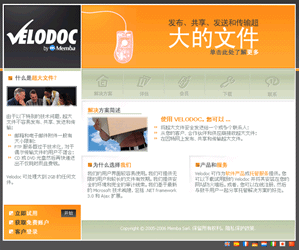
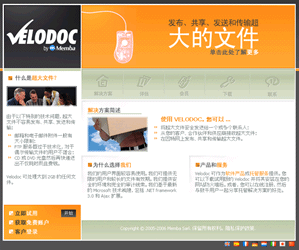
You can check the result at http://www.velodoc.com/zh/ and http://www.velodoc.com/ja/. To download the Asian Pack, simply select View -> Encoding -> More -> Chinese Simplified in Internet Explorer.

Wednesday, November 22, 2006

Resumable file downloads in ASP.NET

The http protocol implements the ACCEPT-RANGES and ETAG response headers to signify the ability to download resources in chunks. There is an interesting article published in MSDN magazine which has some sample code implemented in VB.NET. For the records, similar implementations can be found at:
  1. http://www.thescripts.com/forum/thread334139.html
  2. http://www.devx.com/dotnet/Article/22533/0/page/1

I have made a C# implementation of this code which you can download from http://www.velodoc.com/downloads/061122.blog.zip.

To use this code, you need to:

  1. Create a C# class library named “Memba.FileDownload” or whatever name you deem more appropriate and add the two class files from the archive.
  2. Create a web site and add the following to the system.web/httpHandlers section of the web.config:
    <add type="Memba.FileDownload.DownloadHandler, Memba.FileDownload" validate="false" path="*.zip" verb="*"/>
  3. You also need to make sure the zip extension is mapped to the aspnet_isapi.dll in the IIS management snap-in otherwise your handler will not be called.

To test this code, download a zip file hosted on the web site you have just created. You should be able to stop and resume the download in Internet Explorer or any download manager which supports resumable downloads.

Where do you get your icons from?

I have never been able to find a decent royalty-free library of icons but you only have what you pay for, haven’t you?

IconExperience is the best library I have found and I can only recommend it. It is comprehensive and affordable. Incors have just released version 2.0 which has more than 2000 icons and now includes the 128*128 format.

If you know any other valuable source of icons, please comment.

Wednesday, October 25, 2006

Designing gadgets and widgets for uploading files to Memba Velodoc

Requirements
  • A sender, a Receiver, a Subject, a Message, a File to upload and a checkbox to accept terms (see www.velodoc.net/login.aspx);
  • A progress bar to monitor upload progress;
  • A professional look & feel;
  • To be developed in 3 to 5 days max.
Reference documentation
Findings and impact on technologies
A windows sidebar gadget is a piece of DHTML hosted in the sidebar. Generally what you can do with DHTML can be done in a gadget.

There are limitations though, most of which are related to the browser security sandbox. Effectively a gadget is hosted locally, which has impacts on how it can communicate with remote web sites.

In particular, developing a file upload gadget with a progress bar in DHTML requires a cross-domain iFrame and scripting the iFrame in this case is forbidden. I have tried two nested iFrames which gives you scripting but the deepest iFrame opens in a new browser window instead of within the gadget. The only workaround I have found in half a day is to display the progress bar in a new browser window, but this does not look good and I was not prepared to lose more time.

So, I have considered XBAP WPF browser applications and although there is no File Upload control, I seem to have found the foundations for a file upload gadget here:

But WPF development is really early stage, development environment is primitive, documentation is lacking and I got worried about some warnings related to the sandbox that are mentioned in the literature quoted above.

In these circumstances, the only alternative was Macromedia Flash. I have even found a couple of examples running on the web. I have hosted them within an iFrame of a bespoke gadget and there I was: at the end of day one, I had my design and a fully functional (but ugly) prototype. Further documentation is available at:

Sunday, October 22, 2006

Choosing a GUI library for ASP.NET

You can get an exhaustive list of .NET components at http://www.componentsource.com/ but if you want a GUI library for ASP.NET, your choice is really between:
I would not recommend the other vendors for any of the following reasons:
  • Framework is not sufficiently exhaustive to cover 99% of the requirements;
  • Vendor has not been around for a sufficiently long time;
  • Updates are not sufficiently frequent to follow the pace of new developments like Ajax;
  • Developer license is not royalty-free and/or price is unaffordable;
Infragistics, Telerik and ComponentArt have very similar features, pricing and support when you do not dig into the details of each framework. See the Infoworld comparative article.

I generally find Infragistics to be a richer framework than Telerik and ComponentArt, with two drawbacks: (1) more complex to use and (2) fatter Javascript library to load on the client.

On the mid-term, ComponentArt may have taken a competitive edge by rewriting its components on top of the Microsoft Ajax framework (code-named Atlas).

On the long-term, it is difficult to predict the impact of WPF on web interfaces. On one hand, there is a need for richer interfaces that are easier to develop and Microsoft is committed to deliver the technology (WPF/E) and tools to achieve just that. On the other hand, WPF is really nothing more than Flash the Microsoft way, and very few web sites are developed with Flash yet although the Flash plug-in is available on 90% of internet PCs.

I have personally used Sheridan and now Infragistics controls for years, so I stick with them but if I had to make a new choice now, I would definitely opt for the rewritten ComponentArt controls.

Paypal IPN with UTF8

Today, I got stuck a couple of hours on implementing Paypal IPN with UTF-8 encoding. You get loads of examples on the Web and in the documentation with windows-1252 default charset but none with UTF-8 encoding.

Documentation led me to the wrong track, trying to set the charset and form-charset post fields to UTF-8, but this does not work. You always get a windows-1252 encoded notification.

When you search for the solution on Google, you mostly get complaints from developers who struggle with it and pretend there are bugs.

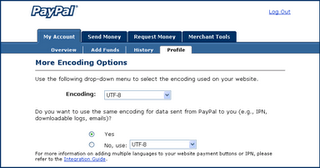
Finally, the solution is obvious (as always). Log to the Paypal web site and go to your profile.
Click the Language Encoding link.


Click the More Options button.


Select UTF-8 in the Encoding drop down list. That’s all!

Friday, October 13, 2006

SourceSafe 2005 issue fixed

More than 6 months ago, I have experienced an awkward problem with SourceSafe.

I periodically run the following script to launch the Analyze tool on SourceSafe databases:

Dim shell
Set shell = CreateObject("WScript.Shell")

Dim sVssAnalyzeCmd
Dim sVssAnalyzeExe
sVssAnalyzeExe = chr(34) & "C:\Program Files\Microsoft Visual SourceSafe\analyze.exe" & chr(34) & " -F -V3 -D "

'----------> First Project
sVssAnalyzeCmd = sVssAnalyzeExe & chr(34) & "d:\vss2005\project1\data" & chr(34)
shell.Run sVssAnalyzeCmd, 7, true

One day, Analyze was reporting the following error:

The file 0\DATA\\ is not a valid SourceSafe physical database file. It must be renamed to a file with an extension or moved to another directory outside the database.

I found a curious fix on the web: to work around this problem, rename the physical file for the database root. Use all uppercase letters in the new name.

I renamed d:\vss2005\project1\data\a\aaaaaaaa into d:\vss2005\project1\data\a\AAAAAAAA and it worked.

I am glad to realize that a fix has recently been made available by Microsoft at:
http://support.microsoft.com/kb/923842/en-us

Thursday, October 12, 2006

Useful networking tools

Today, I was working on integrating a web application with Paypal. My IPN handler in my development environment could not be reached by Paypal, although my test web server was published to the Internet.

Having searched for simple ways to test a Url from the Internet, I have found the following which I recommend: http://www.changedetect.com/cd-test-url.asp

[Updated on 22 Oct 2006]

Endeavouring to compare web hosting packages, I have used:
http://www.vertain.com/?sst

[Updated on 25 Oct 2006]

An excellent and still free web site monitoring service is available at:
http://site24x7.com/

[Updated on 6 Nov 2006]]

A comprehensive DNS toolset can be found at:
http://www.dnsstuff.com/

Preventing page caching and displaying “Page has expired” in ASP.NET 2.0

I have found two answers to this question:

Response.Buffer = True
Response.ExpiresAbsolute = Now().Subtract(New TimeSpan(1, 0, 0, 0))
Response.Expires = 0
Response.CacheControl = "no-cache"

Source: http://www.extremeexperts.com/Net/FAQ/DisablingBackButton.aspx

Note that Response.Expires is deprecated in ASP.NET and Response.Cache.SetExpires should be used instead.

<%@ OutputCache location="none" %>

Source: http://www.syncfusion.com/FAQ/aspnet/WEB_c25c.aspx

More details at http://www.c-sharpcorner.com/asp/Articles/CachingInASPDPL.asp